Shiney Object Syndrome (SOS) - Silent AI project killer | Models and Agents and Tools, Oh My!
"Garbage in - Garbage out (GIGO)" - Charles Babbage
During a 1919 libel trial, attorneys tried to prove Henry Ford was ignorant by grilling him with basic schoolhouse trivia. Ford famously fired back that his desk featured a row of electric push-buttons he could use to instantly summon specialists to answer any complex question, arguing it was foolish to clutter his mind with facts his team could easily supply.
Today, as developers, AI is our row of push-buttons, but it only works if those buttons connect to the right experts. You don't have to be a seasoned enterprise architect to build a production-ready application with AI; you just need to provide the AI with the scarce architectural blueprints it can’t find on the web. By feeding it the proper reference documents and structural standards—essentially wiring up the right "buttons"—you ensure the LLM generates predictable, extensible systems instead of an unmaintainable, hallucinated mess.

It is my opinion that the Agile Manifesto ("Working software over comprehensive documentation") significantly contributed to the disintegration of architecture and software design. The consequence is that AI cannot effectively generate or maintain complex systems because we stopped writing down the blueprints 20 years ago. LLMs are heavily trained on billions of lines of public code, drawing largely from open-source repositories like GitHub and public discussion forums like Stack Overflow; because teams no longer produce formal architectural documents, AI models have almost zero quality, modern, end-to-end architectural blueprints to learn from. So when you ask AI to create an application, it can do so very rapidly, adhering to all of your prompting information and business rules, and it will work. But to do so, it has to average out a chaotic mess of contradictory internet code, leading to hallucinations, architectural bleeding, or generic, low-quality structures.
Case in point...
For my GitHub ai-research-blog project, I have a fully functional blog (a refactor of BlogEngine.NET), written by AI, that manages posts, pages, users, categories, and more. I was waiting for that functionality to be completed so that AI could start writing blogs (via an MCP server) and, more importantly, so we could use it for its AI/Human collaboration workflow feature; a workflow where AI writes code, gives me an overview, I review, we update, I approve, and we start the next task. We work in stages in a manner that I can keep up. Again, all of this is fully functional code(see video below).
However, in the following architectural review diagram, you'll see that code has painted itself into corner, no separation of concerns, reusability, nor can it be easily extended; you don't have to be an architect to see this was a mess under the hood.
zoom image
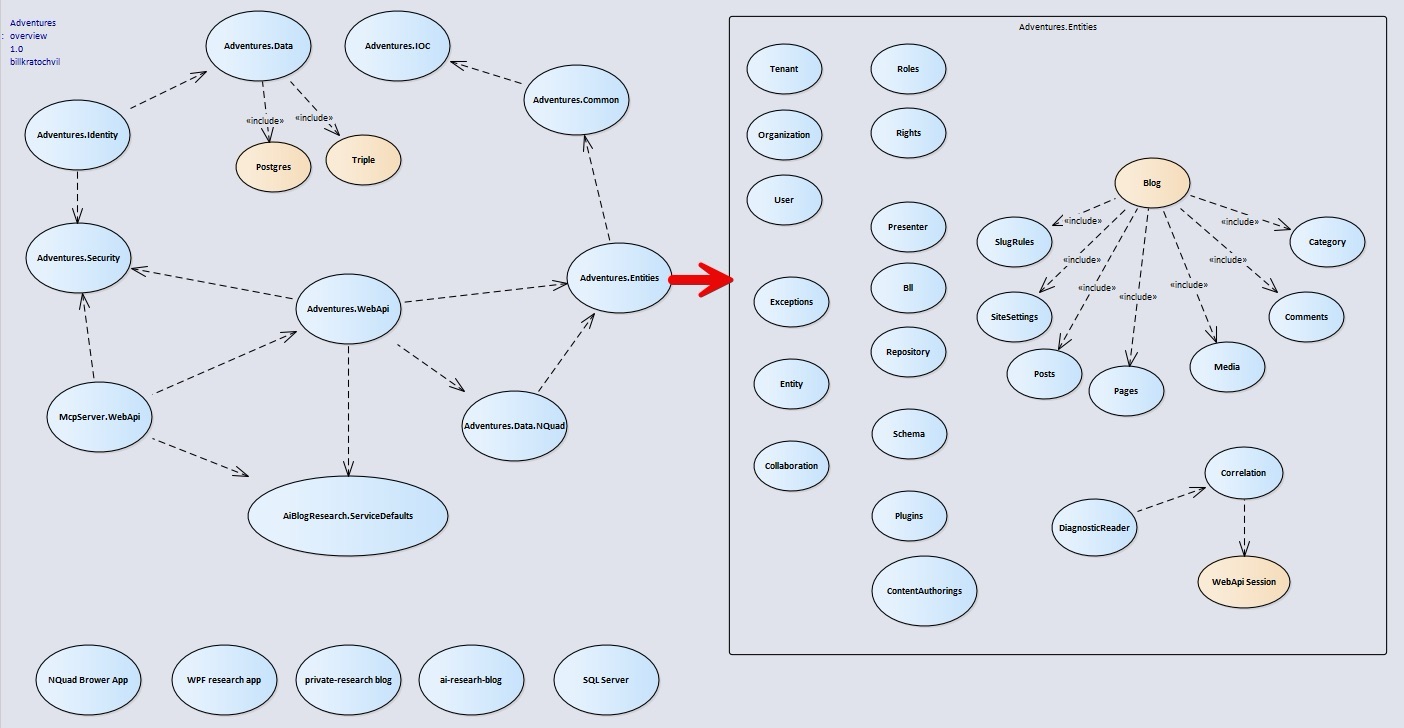
Those bottom-left ovals in the image above are the applications we are going to now create using this framework; their primary purpose is to force AI to use best P&P for IOC, decoupling, and reuse [the research blog is the real app]. To show AI the error of it's ways, my first request was: "can you change the data layer implementation from NQuad (triple stores) to a SQL Server? All you have to do is swap out the IDal (data layer) and create the SQL implementation". Then I asked it, "Can you use this framework to create a WPF application, remembering security is highest concern? All you should have to do is swap out the Angular presentation layer for a WPF application." These real-world questions went on to include multiple client apps to include a NQuad Schema viewer. I already knew the answer - we couldn't.
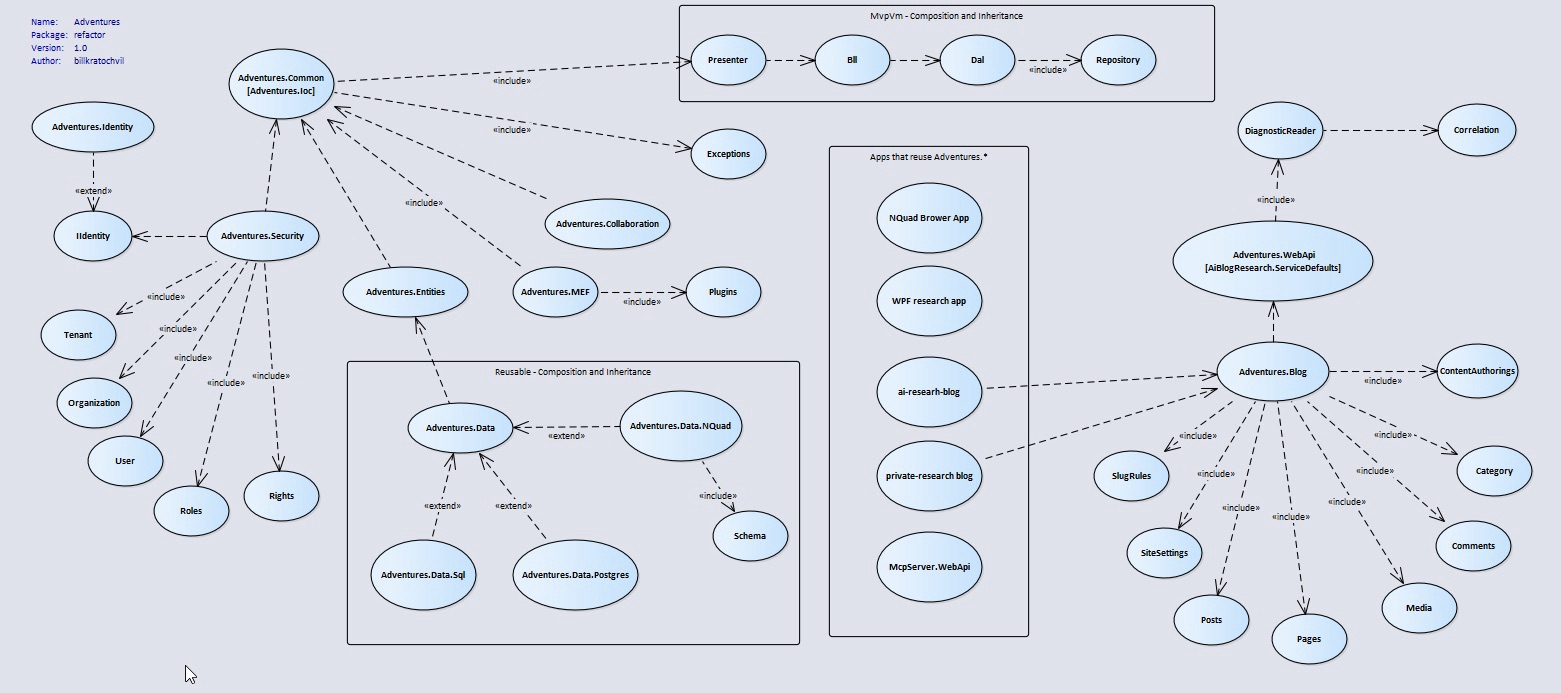
In that same prompt I didn't just highlight issues, I also gave it my architectural gap analysis; the above image of where we are versus the below where we need to be. Below, I showed AI how the project dependencies should work to achieve this goal. I had already created a POC that shows how the MVPVM pattern works so that, with IoC, we should only have to change the configuration of the IoC container to meet those questions; everything would be reusable and plug-and-play—particularly when we use the MEF [plugin] components. However, that POC was ignored by AI for the development of this framework; it relied on its own training. This is that major refactor I was alluding to above; this very functional framework would have prevented us from doing much else with it outside of a blog application, making future features a risk as they may not be possible [the exact place I am in right now].
zoom image
Here is where those buttons come into play. They are just as critical as the prompt information you give it to create the program, it provides the details to AI on "how" to generate the code under the hood.
I gave AI the following architectural documents and told AI to read them "do not infer" [AI will guess and move on] and from them, coupled with the UML diagrams, generate an architectural document that will serve as the standard for our code moving forward. I instructed AI that it must reference this newly created architectural document before churning out new code, and must use it before its own training or any external source; they follow:
|
The AppArchGuide document will teach AI all of the basic principles of software design. The other documents are important because, regardless of the programming language used, the views, model, and how the view is updated is a universal design pattern. Those documents are the answer to Martin Fowlers PresentationModel [MVVM] pattern when it became obsolete because of modern UI controls.
AI needs to understand our history, lest it's problems repeat themselves.
|
 |
Claude would generate the following document: Claude-architecture-reference.md (18.84 kb)
Important note: remember that AI has a finite context window (it can't use all of the information). What I do is emphasize that it take the supplied documents, and from available prompt context, take what it needs from them to create the code architecture document (above link). AI will admittedly say it only read the applicable sections (there is a lot) so this process may be necessary for every new project. I'll emphasize, not only have it write this document, but ensure that it uses it with every new session - also bear in mind that it will be the first on the chopping block when sessions exceed context window size; keep your sessions small, have AI create a summary of it, use the summary for next session.
Follow up
Even with these steps, your job is not done yet. You'll have to follow up and review the code; when we were done with the refactor yesterday I did a review and there were still a lot of gaps, such as a security folder with our permissions classes sitting in Entities, versus the Security project (simple stuff). After my review I provided the following prompt (left pane) and AI found everything I did, and then some; so you don't have to do the heavy lifting.
The AI scans deliverables follow: Claude-review-2026-11-foundation-scan.md (15.94 kb)
zoom image
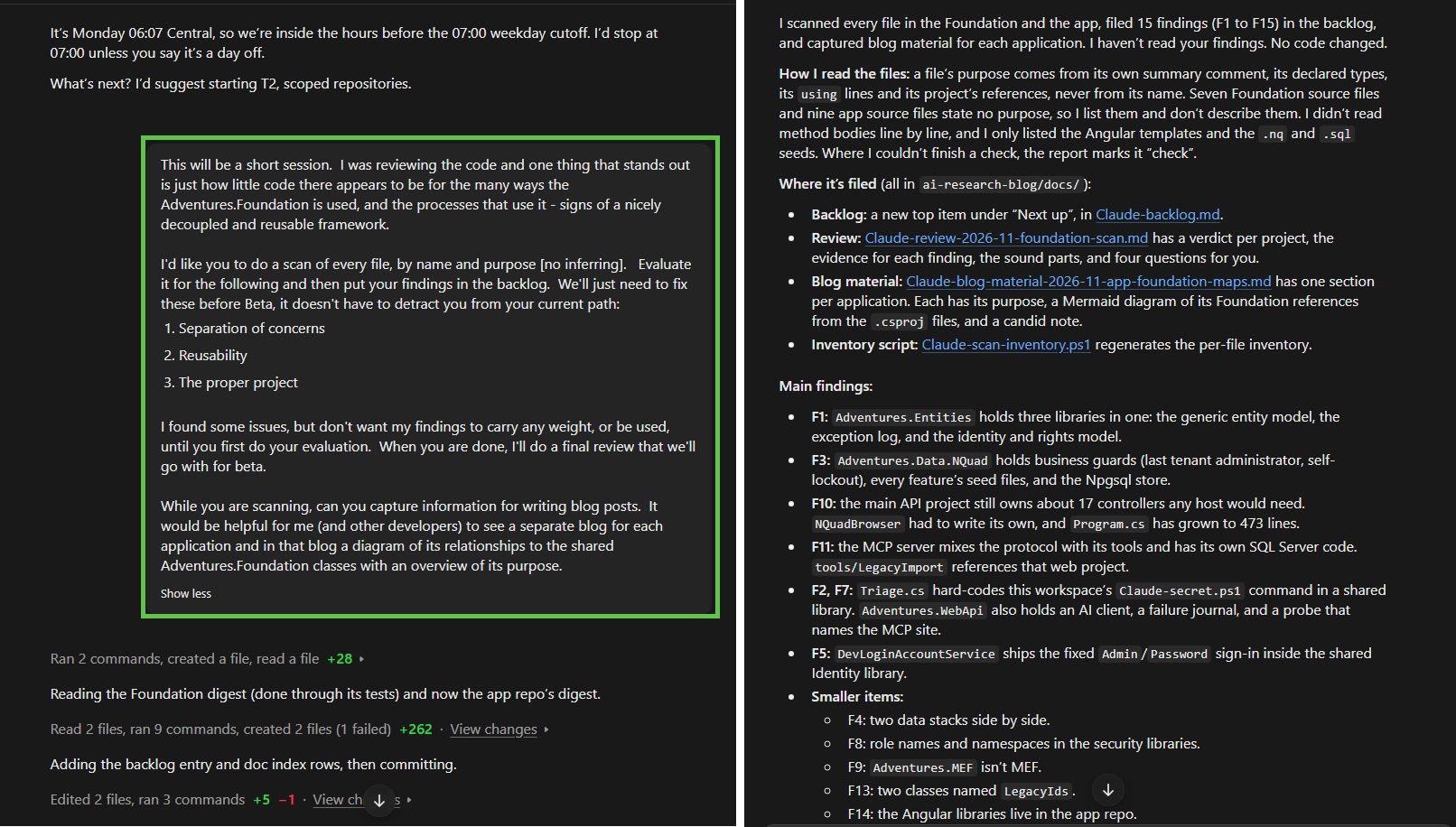
So just as you have to test and follow up on business rules, behaviors, and flow (rinse and repeat), you'll have to follow-up on the underlying architectural work as well. I'll be doing a final review after we complete this backlog item - at least for beta (rinse and repeat)